The best lighting for a home office combines natural daylight, general room lighting and focused task lighting. No single lamp or ceiling fitting will suit every activity, because computer work, reading documents, video calls and detailed tasks can all require different types of light.
A well-lit home office should allow you to work comfortably without squinting, leaning towards the screen or dealing with distracting reflections. It should also remain practical throughout the day, including early mornings, dark winter afternoons and evening working.
Many home offices are created in spare bedrooms, dining areas or converted corners that were not originally designed as workspaces. The existing lighting may therefore be too dim, positioned behind the desk or dominated by one bright ceiling light.
Improving the lighting does not always mean installing the brightest fittings available. The aim is to create balanced, controllable illumination that supports concentration while reducing glare, harsh shadows and visual discomfort.
How much natural light should a home office have?
Natural daylight can make a home office feel brighter and more pleasant, but the amount of daylight is only part of the issue. Its direction and how it interacts with your screen are equally important.
A desk positioned directly in front of a bright window may leave you looking into strong light. This can make the screen appear darker and encourage you to increase its brightness unnecessarily. A window directly behind you can create reflections on the monitor and make video calls difficult because your face may be poorly lit.
Where possible, position the desk so that the window is to one side. This allows daylight to reach the work area without shining directly into your eyes or reflecting straight back from the screen.
The best arrangement will depend on:
- The direction the window faces
- The time of day you normally work
- The size and position of the desk
- Whether you use one monitor or several
- The brightness and reflectiveness of nearby surfaces
- Whether the room receives direct sunlight
A south-facing office may receive strong direct sunlight for significant periods, while a north-facing room may have softer but less intense daylight. East-facing windows can be very bright in the morning, and west-facing rooms may experience glare later in the day.
Blinds or curtains can help control excessive brightness without blocking all natural light. Adjustable blinds are particularly useful because they allow the angle of incoming light to be changed as the sun moves.
Natural light should be treated as one layer of the lighting plan rather than the complete solution. UK daylight varies significantly throughout the year, so an office that works well in summer may feel gloomy during winter unless suitable electric lighting is also provided.
Why is layered lighting better than one bright ceiling light?
A common home-office lighting mistake is relying entirely on one central ceiling fitting.
A single bright light may illuminate the room generally, but it can still leave the desk in shadow. This often happens when the person sitting at the desk is positioned between the ceiling light and the work surface.
One overhead fitting can also create strong contrast. The centre of the room may feel bright while shelving, documents and the area behind the monitor remain poorly lit.
Layered lighting combines different light sources for different purposes.
General lighting
General or ambient lighting provides overall illumination so that the room can be used safely and comfortably.
This may come from:
- A central pendant
- Recessed ceiling lights
- A flush ceiling fitting
- Wall lights
- Track lighting
- Indirect lighting
General lighting should spread light evenly without producing excessive glare. A diffuser can help soften the output from certain fittings and reduce visible bright spots.
Task lighting
Task lighting directs light towards the area where work is carried out. In a home office, this is usually the desk.
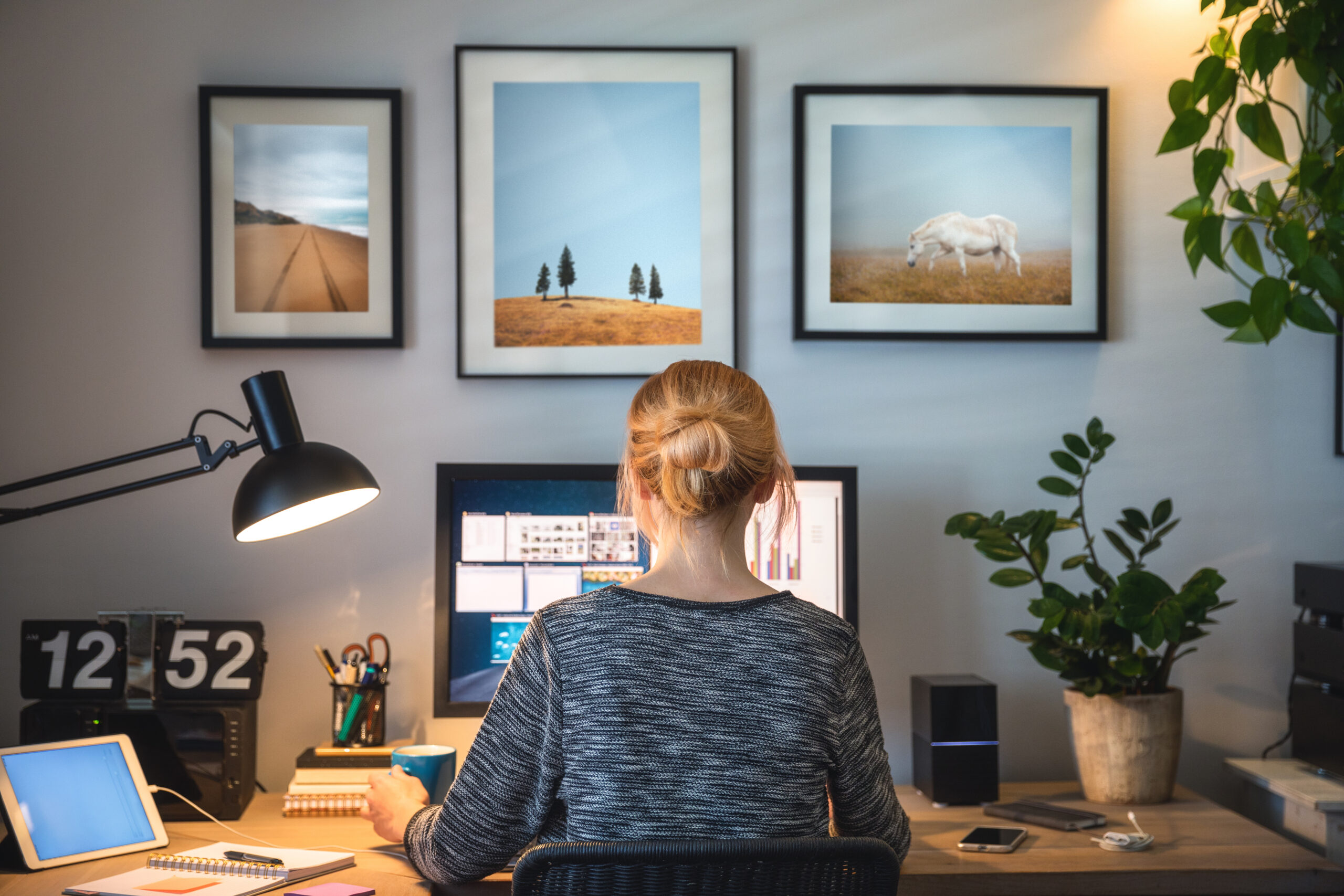
A suitable desk lamp can make printed documents, notebooks and keyboards easier to see without requiring the entire room to be brightly lit. Adjustable lamps allow the direction and intensity of the light to be changed for different activities.
Background or accent lighting
Background lighting is not essential for every office, but it can help reduce the contrast between a bright computer screen and a dark wall.
A small lamp, wall light or indirect light behind the monitor can make evening work feel more comfortable. This is sometimes referred to as bias lighting when used behind a screen.
The light should be subtle and should not shine directly into your eyes or create reflections on the monitor.
By combining these layers, you can adjust the room for different times of day and different tasks instead of working under one fixed lighting condition.
What type of desk lamp is best for working?
The best desk lamp is adjustable, stable and capable of directing light onto your work area without reflecting on the screen.
A lamp with an adjustable arm or head provides more control than a fixed decorative lamp. It can be repositioned when you switch between computer work, reading, writing or detailed tasks.
Useful features may include:
- An adjustable head
- Multiple brightness levels
- A wide, even beam
- A stable base or secure clamp
- Easy-to-reach controls
- Low glare
- Suitable colour rendering
- Replaceable lamps or a well-specified integrated LED
A very narrow, intense beam can create harsh contrast between the lit area and the rest of the desk. A broader spread is often more comfortable for general office work.
The lamp should be placed so that your hand does not cast a shadow over the page. Right-handed users often find it helpful to position the lamp on the left side of the desk, while left-handed users may prefer it on the right.
This is a general guide rather than a strict rule. Monitor position, desk shape and the direction of natural light also need to be considered.
A desk lamp should not point directly at the screen. The aim is to light the working surface rather than the display.
Which colour temperature is best for a home office?
Colour temperature describes whether a light appears warm, neutral or cool. It is measured in kelvins, usually shown as K on the lamp or fitting packaging.
Lower colour temperatures produce a warmer, more yellow appearance. Higher colour temperatures look cooler and closer to blue-white daylight.
For many home offices, a neutral white light between approximately 3,500K and 4,000K provides a practical balance. It tends to feel clearer and more alert than very warm domestic lighting without appearing excessively cold.
The best choice depends on the room and the type of work.
Warm white lighting
Warm white lighting, often around 2,700K to 3,000K, creates a relaxed and comfortable atmosphere.
It may suit a home office that is also used as a bedroom, lounge or reading room. However, very warm lighting can feel subdued during detailed work, particularly in a room with limited daylight.
Neutral white lighting
Neutral white lighting is often suitable for general office tasks because it provides a clean appearance without feeling highly clinical.
It can work well for:
- Computer work
- Reading
- Writing
- Administration
- Video calls
- General creative work
Cool white lighting
Cooler lighting may feel bright and energising, but it can also become harsh if used at high intensity or late in the evening.
Very cool light may be useful for certain detailed tasks, workshops or technical work, but it is not automatically the best option for every home office.
Consistency is also important. Using a very warm ceiling light with a cold desk lamp can make the room feel visually uneven. Choosing sources with similar or complementary colour temperatures usually creates a more comfortable result.
How bright should home-office lighting be?
Brightness should be sufficient for the task without creating excessive glare.
A home office used mainly for computer work may require less direct light on the desk than a workspace used for technical drawings, sewing, model-making or detailed paperwork.
The brightness required will also depend on:
- The size of the room
- Wall and ceiling colours
- The amount of daylight
- The user’s eyesight
- The height of the ceiling
- The position of fittings
- The type of task
- The reflectiveness of the desk surface
Dark walls, flooring and furniture absorb more light than pale surfaces. A small room with white walls may feel well lit with relatively modest output, while a darker room may require additional fittings.
Brightness should ideally be adjustable. Dimmers, lamps with multiple settings and separate switching for different lighting layers make it easier to respond to changing daylight.
Installing one extremely bright light may be less comfortable than using several lower-intensity sources placed carefully around the room.
How can you reduce screen glare and eye strain?
Screen glare occurs when a bright light source or window is reflected on the monitor. It can make text more difficult to read and may encourage awkward posture as you move your head to see around the reflection.
The most effective solution is usually to change the position or direction of the light rather than simply increasing screen brightness.
Position the monitor carefully
Avoid placing the screen directly opposite a window or bright exposed lamp.
Turning the desk slightly may be enough to remove the reflection. Where the desk cannot be moved, adjustable blinds can help control daylight.
Keep exposed light sources out of view
A bright bare bulb in your field of vision can be uncomfortable even when it is not reflected directly on the screen.
Use fittings with shades, diffusers or suitable optics. Desk lamps should direct light downwards or across the work surface rather than towards your face.
Balance the brightness around the screen
A bright screen against a completely dark room creates strong visual contrast.
General or background lighting can soften that contrast. The room does not need to be as bright as the screen, but the surrounding area should not disappear into darkness.
Clean the screen
Dust, fingerprints and smears can increase reflections and reduce clarity. Regular cleaning with a suitable product can make the display easier to view.
Adjust the display settings
Screen brightness should suit the surrounding light. A display that is significantly brighter than the room may be uncomfortable, while a screen that is too dim can also be difficult to read.
Display settings are not a substitute for good room lighting, but they form part of the overall working environment.
Where should home-office lights be positioned?
Lighting positions should be planned around the desk and user rather than simply around the centre of the room.
Ceiling lights
If recessed lights or spotlights are being installed, avoid placing a very bright fitting directly above or behind the seated position where it may cast shadows across the desk.
A row of carefully positioned fittings may provide more even illumination than one central source.
Track lighting can offer flexibility because individual heads can be directed towards walls, shelving or work areas. However, it should be adjusted to avoid screen reflections.
Desk lamps
Position the lamp so it illuminates the documents and keyboard without shining on the monitor.
A clamp lamp can be useful on a small desk because it does not take up much working space. However, the desk or shelf must be strong and suitable for the fitting.
Wall lights
Wall lights can provide soft background illumination and free up desk space.
Indirect wall lights that direct light upwards or across the wall can reduce harsh contrast. They may be especially useful in compact offices where floor and desk space is limited.
Lighting behind the monitor
A low-level light behind the screen can improve the visual balance during evening work.
It should not be so bright that it creates a glowing distraction around the display. A soft, even light is generally more comfortable than a visible point source.
What lighting works best for video calls?
Video calls create a different lighting challenge because the aim is to light your face evenly.
A window directly behind you can turn you into a silhouette. A strong ceiling light directly overhead may create shadows beneath the eyes and chin.
For clearer video:
- Face towards a window where practical.
- Place a lamp behind or beside the screen.
- Avoid very bright light directly behind you.
- Use soft, diffused light rather than a harsh spotlight.
- Keep the light close to face height.
- Avoid mixing strongly different light colours.
A desk lamp may work if it can be directed towards a pale wall, allowing reflected light to soften the output. Dedicated video lights are also available, but they are not always necessary.
The background should be visible without being brighter than your face. A small lamp in the background can add depth, provided it does not distract from the call.
Are LED lights suitable for a home office?
LED lighting is commonly used in home offices because it is energy-efficient, widely available and suitable for many different fitting types.
However, not all LED products provide the same quality of light.
When selecting LED lighting, consider:
- Colour temperature
- Brightness
- Beam angle
- Dimming compatibility
- Colour rendering
- Flicker performance
- The quality and reliability of the product
Colour rendering describes how accurately colours appear under the light. This can be particularly important for designers, photographers, artists and anyone assessing physical products or printed materials.
Cheap or poorly specified LED products may produce visible or imperceptible flicker, inconsistent colour or early failure. Choosing suitable lamps and compatible controls can help avoid these problems.
Integrated LED fittings may offer a clean appearance, but the complete fitting may need replacement if the light source eventually fails. Fittings that accept replaceable lamps can make future maintenance simpler.
Should you install dimmer switches?
Dimming can be useful in a home office because lighting needs change throughout the day.
You may prefer brighter illumination during a dark morning, moderate light alongside daylight in the afternoon and softer background lighting in the evening.
A dimmer can provide flexibility, but the lamps, drivers and switch must be compatible. Incompatible LED products may flicker, buzz, fail to dim smoothly or remain faintly illuminated when switched off.
A qualified electrician can advise whether an existing lighting circuit and fittings are suitable for dimming.
Separate control is often more useful than one dimmer controlling every light. For example, the ceiling lights, desk area and background lighting could be operated independently.
What if the home office is in a small or shared room?
Many people do not have a dedicated office. The workspace may be in a bedroom, dining room, landing or corner of the lounge.
In a shared room, lighting needs to support work without making the rest of the space uncomfortable.
A focused desk lamp can provide task lighting without illuminating the entire room. Wall-mounted or clamp lights can preserve limited desk space.
Lighting controls should also allow the room to return to its other use. A bedroom office may benefit from neutral task lighting during the day and warmer general lighting in the evening.
Cable management is particularly important in temporary work areas. Lamps should be positioned close to suitable sockets without extension leads crossing walkways.
Where the office is used regularly, adding correctly positioned sockets and permanent lighting may be safer and more practical than relying on trailing cables and temporary fittings.
When should you consider changing the fixed lighting?
Portable lamps can improve many home offices, but they may not resolve every problem.
Changes to the fixed lighting may be worth considering when:
- The desk is permanently in shadow.
- The only ceiling fitting produces harsh glare.
- The room has no suitable task lighting.
- Existing fittings flicker or buzz.
- The office is used every day.
- Video calls are consistently poorly lit.
- Several extension leads are required.
- The room has been converted from another use.
- The existing switches are inconveniently positioned.
A lighting plan can consider the room’s layout, natural light, furniture and expected use before new fittings are installed.
Any electrical installation work should include an assessment of the existing circuit and appropriate testing after completion.
Frequently Asked Questions
Is warm or cool light better for working from home?
Neutral white light is often a practical choice for office work. Warm light can feel relaxing, while very cool light may feel harsh. The best option depends on the room, working hours and type of task.
Should a desk face a window?
A desk can face a window, but strong daylight may cause glare or make the screen appear dark. Positioning the window to the side of the desk often creates a more balanced working arrangement.
Is a desk lamp enough for a home office?
A desk lamp may provide effective task lighting, but it is usually more comfortable when combined with general room lighting. Working with one bright lamp in an otherwise dark room can create excessive contrast.
What is the best light for video calls?
Soft light positioned in front of you and close to face height generally provides the most flattering and practical result. Avoid a bright window or lamp directly behind you.
Can LED office lighting cause headaches?
Some people may find harsh brightness, glare or flicker uncomfortable. Choosing good-quality LED products, reducing glare and balancing the light around the room may help. Persistent headaches should also be discussed with an appropriate healthcare professional.
Do home-office lights need to be installed by an electrician?
Plug-in desk lamps do not normally require installation. New fixed fittings, switches, sockets or changes to electrical circuits should be completed and tested by a competent electrician.
Create balanced lighting for every part of the working day
The best home-office lighting is not simply the brightest available option. It is a combination of natural daylight, comfortable general illumination and adjustable task lighting.
Position the desk to control window glare, use a suitable lamp for paperwork and balance the brightness around computer screens. Neutral white light is a practical choice for many offices, although the right colour temperature depends on the room and how it is used.
A flexible arrangement is especially valuable because daylight changes throughout the day and across the seasons. Separate controls, adjustable lamps and carefully positioned fittings allow you to create brighter conditions for detailed work and softer lighting when the room is used for other purposes.
Where the existing lighting leaves the desk in shadow, creates persistent glare or depends on trailing extension leads, changes to the fixed electrical installation may provide a safer and more effective long-term solution.
For advice about home-office lighting, additional sockets or safely upgrading an existing lighting circuit, contact Big Fish Electrician.
Phone: 07789 214528
Email: mike.thomas@bigfishea.co.uk
Find out more: Big Fish Electrician